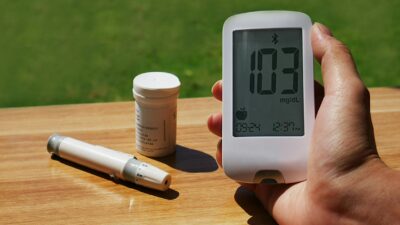
The FreeStyle Libre 14 day reader is Abbott’s handheld touchscreen device that scans a compatible Libre sensor to display real-time glucose, trend, and 8-hour history. It pairs with the original FreeStyle Libre 14 day sensor and does the same job as the LibreLink smartphone app for users who prefer a dedicated device.
Where the Reader Fits in the FreeStyle Libre System
The Libre system has two parts: the disposable sensor you wear on the back of your upper arm, and the “thing” you use to view the data. That “thing” can be:
- A standalone FreeStyle Libre reader (a dedicated touchscreen device from Abbott).
- A supported smartphone running the LibreLink app.
- Both — the reader and app can be used together if each scans at least once every eight hours.
The reader is compatible with the original FreeStyle Libre 14 day sensor. It is not compatible with Libre 2 or Libre 3 sensors, which require their own readers or apps.
How a Scan Actually Works
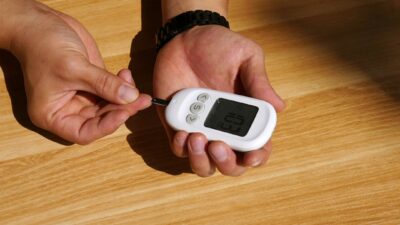
You hold the reader within one to four centimeters of the sensor. Near-field communication (NFC) wakes up the sensor and transfers the last eight hours of stored readings plus the current value. Each scan gives you:
- Current glucose in mg/dL or mmol/L.
- A trend arrow (rising rapidly, rising, stable, falling, falling rapidly).
- A chart of the previous eight hours.
Scanning at least every eight hours captures all sensor data without gaps. Miss that window, and you lose whatever readings rolled off the sensor buffer.
What the Reader Stores and Shows
| Feature | FreeStyle Libre 14 day reader |
|---|---|
| On-device data storage | Up to 90 days |
| Glucose display | Real-time value + 8-hour history |
| Trend arrow | Five directional states |
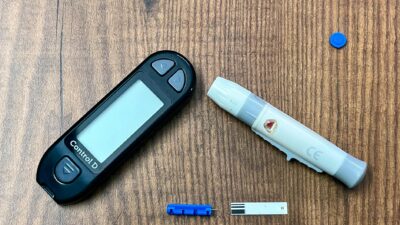
| Built-in blood glucose meter | Yes (uses FreeStyle Precision Neo test strips) |
| Blood ketone strip support | Yes (FreeStyle Precision ketone strips) |
| Continuous Bluetooth streaming | No — scan-based only |
| Real-time alarms | No (unlike Libre 2) |
| Data export | Via USB cable to LibreView |
Setting Up the Reader
Out of the box, you charge the reader via micro-USB, set the date and time, enter your target glucose range, and calibrate the display units. Before the first sensor scan, you scan the sensor’s start code — an NFC handshake that pairs reader to sensor for the 14-day wear period.
The one-hour sensor warm-up still applies; readings do not display until warm-up completes.
Accuracy — Sensor, Not Reader
Accuracy in a Libre system is a property of the sensor. The reader simply displays what the sensor reports. Abbott’s pivotal study in adults found an overall MARD of approximately 9.4 percent for the original 14-day sensor versus reference venous plasma glucose — within the FDA’s general benchmark for non-adjunctive CGMs.
Accuracy is typically best in the mid-range and can drift at very low or very high values. A finger-stick confirmation is appropriate when symptoms and sensor reading disagree. The reader’s built-in meter makes that easy without carrying a separate device.
Who a Standalone Reader Makes Sense For
The reader suits users who:
- Do not own a compatible smartphone or prefer not to run health apps on their personal phone.
- Use a flip phone or older Android device not supported by LibreLink.
- Want a single device that scans the sensor and also runs finger-stick strips.
- Need a backup when their phone battery is dead.
- Are older adults or caregivers more comfortable with a dedicated, simple interface.
For most newly-diagnosed adults, the LibreLink app on a smartphone is equally effective and easier to share with clinicians through LibreView. The question is comfort and consistency, not capability.
Sharing Data With Your Clinician
The reader connects to a computer via USB to upload data to LibreView, Abbott’s cloud platform. Clinicians can review Ambulatory Glucose Profile (AGP) reports, time in range (TIR), and glucose management indicator (GMI) — the CGM-derived estimated A1C. These metrics supplement, not replace, a lab A1C. See our A1C levels overview for lab context.
The ADA Standards of Care emphasize AGP review for anyone on insulin and encourage its use in broader diabetes management.
Limitations of the 14-Day Reader System
- No real-time alarms. You only learn about a high or low when you scan. Libre 2 and Libre 3 add alarms.
- No Bluetooth streaming. Data is scan-based. Miss the eight-hour window and you lose a segment of history.
- Reader is not waterproof. Keep it away from pool decks, sinks, and bathroom shelves.
- Newer sensors are not compatible. The 14 day reader pairs only with the original 14-day Libre sensor.
Who Typically Wears the Sensor
FreeStyle Libre 14 day sensors are cleared in the US for adults with diabetes. They are most commonly prescribed for people with type 1 diabetes, insulin-treated type 2 diabetes, and gestational diabetes. Non-insulin type 2 diabetes and prediabetes use cases are growing; coverage varies. Clinicians often review the data alongside broader prediabetes treatment planning.
The Bottom Line
The FreeStyle Libre 14 day reader is a reliable standalone way to use Abbott’s original 14-day sensor. It gives scan-based glucose, a trend arrow, and an 8-hour tracing, plus a built-in meter for finger-stick confirmation. If you want real-time alarms or Bluetooth streaming, consider Libre 2 or Libre 3. If you want a simple, dedicated device, the 14 day reader still does its job well.
This article is for educational purposes only and is not medical advice. Always consult a licensed healthcare professional about any device, test, or health decision.